In this entry, let’s think about which slide size to use in PowerPoint.
As I explain below, slide size is something you should decide at the start and ideally never change afterward. So which size should you choose?
toc
How to Change the Slide Size
First, here’s how to change the slide size:
- Click the “Design” tab → “Slide Size”
- Choose the size you want
That’s all. If you’re not sure, see the following page on Microsoft’s official site.
Change the size of your slidesThe default slide size should be “Widescreen (16:9).” For now, it’s a good idea to open a new file and try switching to other slide sizes a few times.
Why Slide Size Matters
Back to the topic. You need to decide your slide size carefully, at the start.
The reason is that changing the slide size of materials you’ve already made takes a lot of resources.
Obviously, changing the slide size throws off the layout. Try placing some content on a slide and then changing the slide size. At the very least, the margins will have changed.
With carefully crafted slides, it doesn’t stop there. Line breaks shift, content spills off the slide, and so on.
In short, changing the slide size makes the materials you’ve made unusable, at least for a while. To use past materials at the new slide size, you have to fix the layout of every one of them, which takes a lot of resources.
This is a big problem especially for people and organizations that reuse past materials. Of course, although you could leave the slide size of old materials unchanged, they then won’t be consistent with your new materials.
Neither fixing a large number of materials nor having inconsistent materials is desirable. So ideally, you should never change the slide size you first chose.
Incidentally, I’ve changed my slide size twice. Please don’t follow my example.
How to Choose a Slide Size
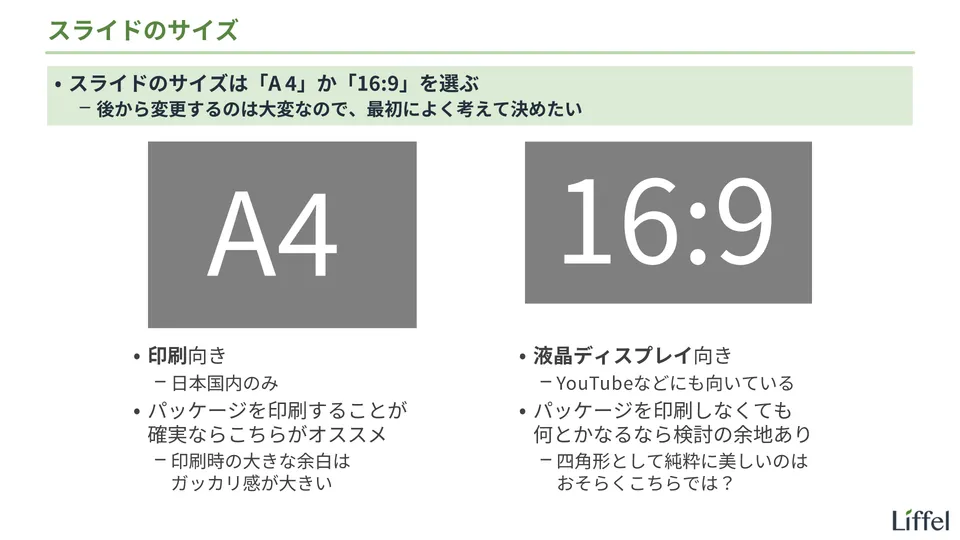
So which size should you choose? I’ve summarized it in the slide below.
To give the conclusion first: if you care most about how your materials look when printed, choose your standard paper size (A4, or Letter in the US); if you care most about how they look on screen, choose 16:9.
Let me explain.
The Criterion
First, the most important criterion in deciding the slide size is how well it fits the medium your materials are printed on or shown on. If the slide and the medium have the same proportions, no extra margins appear and the result looks good. If they don’t match, unnatural margins appear and the result looks unpolished.
We mainly print or show our materials on the following three:
- Paper
- Monitors and other displays
- Projectors
Of these, you don’t need to consider projectors. When you project, margins on the screen are a given, and recent projectors can project either size. Although very old projectors may not output 16:9, that’s not a risk worth considering1.
In other words, the criterion for deciding the slide size is whether you’d rather fit paper or displays.
The Options
Following this criterion narrows the options down to these two:
- Your standard paper size (A4, or Letter in the US)
- 16:9
These fit paper and displays exactly, respectively.
First, the standard printing paper is A4 in most countries, including Japan, and Letter in the US and Canada. Both are available as slide sizes in PowerPoint. Meanwhile, most displays in use today are 16:9. Web services such as YouTube and Zoom also use a 16:9 screen ratio.
Although PowerPoint offers many other slide sizes, none of them fit either paper or displays exactly. Unless you have special reasons, there’s no reason to choose them.
Which One to Choose: More Detailed Guidelines
So which should you choose?
The idea is simple: paper size if you care most about how things look when printed, 16:9 if you care most about how they look on screen. Decide based on which medium you want an exact fit for.
As I mentioned, I’ve had the bitter experience of changing my slide size twice. Based on that experience, I’ve put together some more detailed guidelines. Although I can’t say whether they’re right, use them as a reference if you’re torn.
First, if you’re sure your materials will be printed and there’s no way around it, choose paper size without hesitation.
This is just a feeling, but margins on paper seem far more disappointing than margins on a screen. On a display, the margins are black, so they don’t stand out much. By comparison, unnatural margins on a printed page look genuinely sloppy. It’s best to avoid that.
Since the COVID-19 pandemic, however, there are far fewer occasions to print materials. You also can’t ignore the cost of printing or growing concern for sustainability. If you think you can get by without printing, I recommend going with 16:9.
Besides the obvious reason that “it looks better on screen,” there are two more:
- 16:9 is probably more beautiful as a rectangle
- Since you can ignore printing, bold colors and photos become easier to use
Let me explain each.
Advantage of 16:9 #1: More Beautiful as a Rectangle
First, 16:9 is likely more beautiful as a rectangle (a shape people find more pleasing).
Ratios of width to height like slide sizes are called “aspect ratios.” The film and TV industries have changed them many times over the years, looking for the aspect ratio that makes images most appealing.
Roughly speaking, the history is a shift from 4:3 (the ratio of old TVs, close to A4 and Letter) toward wider formats2. As a result, 16:9 is now the standard for displays. You hardly ever see 4:3 displays anymore. PowerPoint’s default slide size, too, used to be 4:3 and at some point became 16:9.
Although why wider shapes are preferred isn’t clear, my hypothesis is that “people prefer rectangles close to the shape of their field of vision.” In fact, if you think of our field of vision as a rectangle, it’s closer to 16:9 than to 4:3 (A4) (not that I’ve ever seen anyone else’s field of vision). Here’s the slide from earlier again; take a look.
In the end, I suspect we simply like 16:9 better than 4:3 (A4). In fact, I switched my slide size from A4 to 16:9 during the pandemic, and now A4 slides look quite frumpy to me.
So, as a plain rectangle, 16:9 is (probably) more beautiful. That’s why my view is that even if there’s some chance your materials will be printed, as long as it’s rare (for example, when someone who receives your PDF prints it), it’s better to accept that cost and go with 16:9.
Advantage of 16:9 #2: Bold Colors and Photos Become Easier to Use
Next, for slides that serve as landmarks, such as cover slides, bold colors and photos become easier to use. Strictly speaking, this is an advantage of deciding not to print rather than of 16:9 itself, but the result is the same.
For example, it becomes easier to use striking color schemes such as “a dark background with white text.” Doing this in print uses a lot of ink, and the colors can come out faded. If you don’t print, you don’t need to worry about that.
If You’re Still Unsure
Finally, if you still feel you can’t assess the risk around printing, just choose your paper size (A4 or Letter) for now.
In fact, changing the slide size from A4 or Letter to 16:9 doesn’t do that much damage.
In PowerPoint, A4, Letter, and 16:9 slides all have the same height. Changing to 16:9 only widens the margins on both sides; it doesn’t wreck the layout. As I mentioned, I made this change recently, and compared with when I changed from 4:3 to A4 earlier3, it took hardly any resources.
Of course, although it’s best to avoid even this change if you can, it’s far less painful than other size changes. So you could set a trial period of “making materials in paper size but not printing them,” and switch to 16:9 if that goes fine.
That covers how to think about slide size.
All presentation-related entries are collected below.

Footnotes
-
That said, if there’s a projector you use regularly, it’s worth checking which aspect ratios it supports, just in case. ↩
-
If you want the details, search for something like “history of aspect ratios.” ↩
-
I originally chose 4:3 because I didn’t understand the importance of slide size and simply used the default at the time. ↩