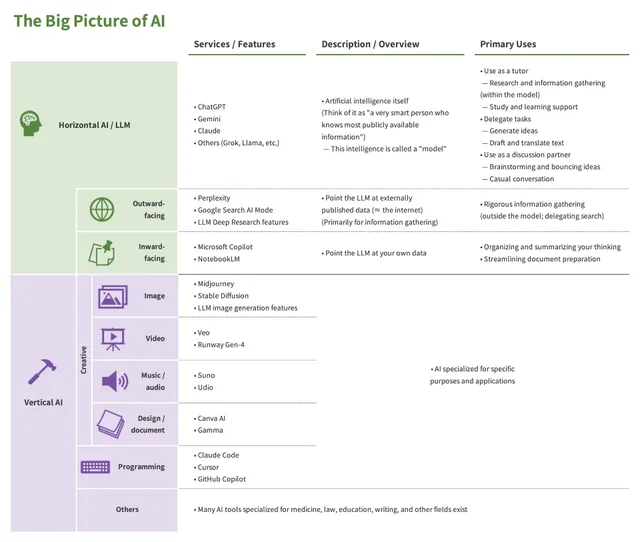
This entry explains how to build a custom AI. Here, “custom AI” refers to the following features in the major AI services (more on this below).
- ChatGPT: GPTs (sometimes called “CustomGPT”)
- Gemini: Gems
- Claude: Projects
Once you can use custom AIs effectively, the value you get from AI rises sharply. They are essentially required whenever you use AI for streamlining your work, as opposed to simple lookups. Make sure you have a solid grip on this topic.
A note before we begin: this entry assumes you already have some hands-on experience with AI. If you are a complete beginner, please start with the entry below and read in order.
toc
Custom AI
A “custom AI,” as the name suggests, is an AI whose thinking and output style have been customized in a particular direction1. Roughly speaking, you can think of it as an AI that has been told what to do in advance.
The easiest way to grasp the idea is to look at an example. Below is a custom AI called “Summary Bot,” built with Gemini’s Gems (you can name it whatever you like).
The user only pasted in a link, yet the AI produced a substantive response. Summary Bot is a custom AI that “reads a piece of writing, summarizes it, and judges its key points, implications, and whether it is worth reading,” so the moment it receives a piece of writing (in this case a link), it acts accordingly.
A custom AI is precisely this: a setup where what to think about, how to think about it, and what kind of output to produce are all decided in advance.
Custom AI: an AI whose thinking and output style have been customized in a particular direction.
Custom AI Features in the Major AI Services
As mentioned at the start, all of the major AI services offer a way to build custom AIs. Here is a summary.
- ChatGPT: GPTs
- Available only on paid plans
- The “Projects” feature is available on the free plan and lets you give the AI instructions, but those instructions are not strongly referenced
- Gemini: Gems
- Claude: Projects
If you have no particular preference, Gems is the easiest place to start. It is available on the free plan, and the lower-tier model has no usage cap, which makes it ideal for experimenting and getting a feel for what custom AIs are. Once you understand the basics, you can pick the service that best fits each use case (for example, you might build a custom AI that pushes back hard on your ideas in ChatGPT).
Custom Instructions
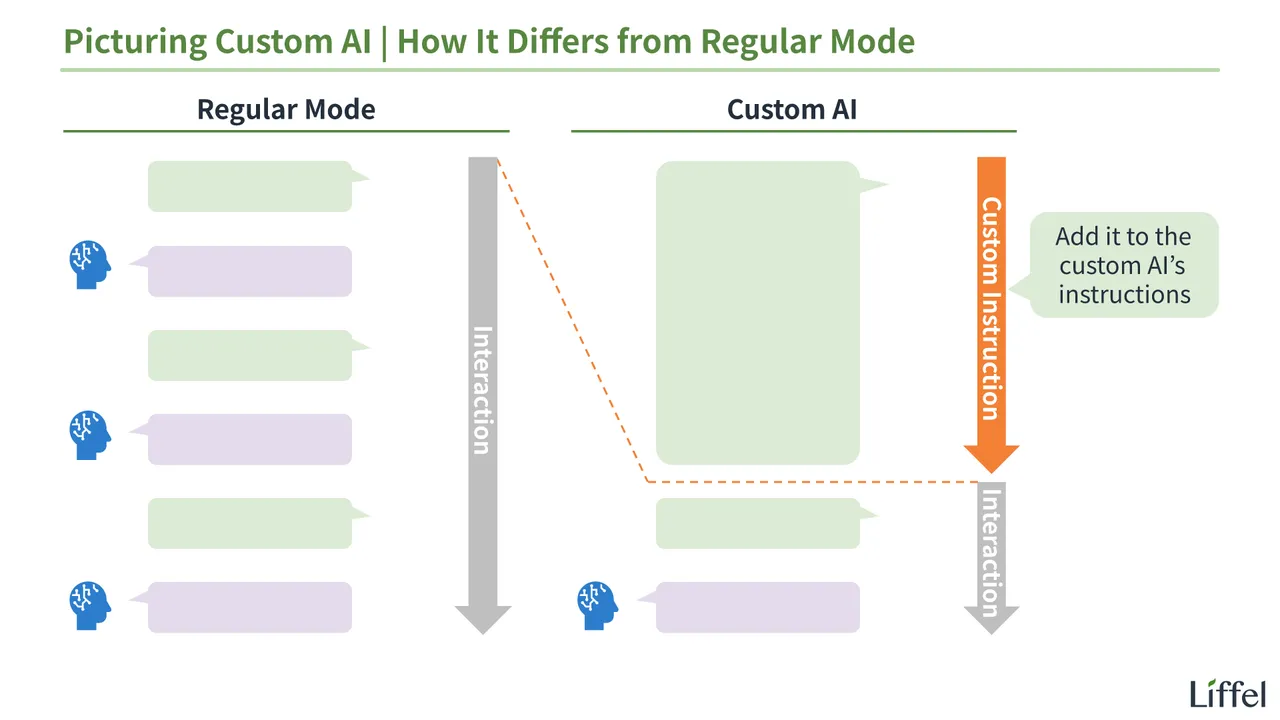
A custom AI is built by writing a set of instructions for the AI, called “custom instructions.” The image below should make this clear.
As shown, a custom AI is set up so that the first input has already been entered before the chat begins. That “first input” is what we call the custom instructions.
Custom instructions: the instructions given to an AI that determine how a custom AI behaves.
The Custom Instructions Behind “Summary Bot”
As an example, here are the custom instructions behind the Summary Bot shown earlier.
## Role
You are an AI that helps users understand written material.
Summarize the text or information the user provides, and explain the key points and background in a clear, accessible way.

## How to Respond
Read the text and address the following four points in your response.

1. A summary of the content
2. The key points
3. Implications for real-world or practical work
4. Whether the original is worth reading (rated on a 5-star scale, e.g., ★★★★☆ for 4/5)

You do not need to separate these into distinct sections. Cover all four in a single response.

## Guidelines
- Explain technical terms when needed
- Condense long passages
- Structure the explanation so it is easy for the user to follow
The moment Summary Bot starts up, it has already loaded these instructions. That is why, in actual use, it can get straight to work the instant you hand it a link.
That is what custom instructions are.
How to Write Custom Instructions
Now let us look at the process for writing custom instructions. The following three steps work well.
- Have an AI draft them for you
- Implement them as a custom AI
- Whenever you spot something to improve or are unhappy with the output, revise them
I will go through these in order.
Step 1: Have an AI Draft Them for You
For the first version, letting an AI write them for you is by far the best approach. In regular mode, send the following message to any AI (ChatGPT, Gemini, Claude — whichever you prefer). You do not need to understand its content; copying and pasting it as is works fine.
Please write custom instructions for a custom AI (such as ChatGPT's GPTs or Gemini's Gems).

Before writing the custom instructions, ask me one question at a time, in order, to gather the information you need. Focus on the items below.
Do not write the custom instructions until all questions are complete.

1. Role and goal: What is this AI, and what end state (outcome) should it deliver to the user?
2. Preconditions: What background information is needed to make the answers accurate (information about the user, their situation, their environment, etc.)? For example, a custom AI giving health advice would need the user's age, sex, medical history, and so on.
3. Reasoning process: Before answering, what should the AI analyze internally, and in what order should it build its argument?
4. Output format: What concrete format should the output take — a table, Markdown, a bulleted list, or something else?
5. Constraints and behavior: What rules must always be followed, what expressions must be avoided, and what tone is preferred (formal, concise, etc.)?

Instructions:
- For items other than "1. Role and goal," skip the question if it is not relevant given the role and goal
- For each item, if my answer is too abstract, dig deeper by offering concrete examples ("Do you mean something like X, for example?")
- Add any additional questions you think you should ask, depending on the use case (IT, business, education, and so on)

Final output format:
Once all the questions are done, assemble the custom instructions with the structure below.
- Prioritize maintainability by using bullet points and line breaks
- Use the heading hierarchy (##, ###) appropriately to make the logical structure visible
- Make the custom instructions as concrete and unambiguous as possible
- Output the final custom instructions as a code block so they are easy to copy
After that, you simply answer the questions, and at the end you get your custom instructions.
Step 2: Implement Them as a Custom AI
After that, just paste the resulting text into the “Instructions” or “Custom Instructions” section of your custom AI, and it is ready to go. Since the exact steps depend on each service’s UI, I will skip the details here. If you get stuck, ask the AI itself.
The one thing worth flagging: the “Description” section is not where the custom instructions belong. That section is for a note to yourself describing what the custom AI does. In most cases, what a custom AI does is already obvious from its name (and ideally you should choose a name that makes it obvious), so leaving “Description” blank is usually fine.
Step 3: Improve Them as You Use Them
Once it is up and running, just keep using it, and revise the custom instructions whenever you notice something to improve or something you are unhappy with.
As you saw earlier, custom instructions are written in natural language, not in a programming language. Minor edits should be easy to do yourself.
The reality is that fine-tuning is something only a human can do, and it is faster that way. With Summary Bot, the AI did most of the work, but the part about “rate whether the original is worth reading in stars” was something I added myself.
If you want to do this seriously, picking up the basics of Markdown will make editing easier. Ask an AI if you are interested.
For larger overhauls, you can hand the work back to an AI.
I am using the custom instructions below for a custom AI, but (the issues / what I am unhappy with). Please improve them.
+++
(paste the custom instructions here)
The Benefits of Custom AIs and When to Use Them
As you can see, writing custom instructions itself is not much work. What really matters is having a solid understanding of what custom AIs are good for and the situations in which they shine.
Without that, you will not even think to say “let me build a custom AI for this.” No matter how far AI advances, this part remains our job. Leave the custom instructions to the AI, and focus your own thinking on what to make a custom AI do.
The Benefits of Custom AIs
Let us first organize the benefits of custom AIs. There are two.
- The quality of the AI’s responses goes up
- Interacting with the AI becomes more efficient
I will go through these in order.
Benefit 1: The Quality of the AI’s Responses Goes Up
First, using a custom AI raises the quality of the AI’s responses. There are a few reasons for this.
- Responses become more accurate — closer to the answer
that fits your specific situation
- Although custom AI does not make the underlying model smarter, detailed, specific instructions let you draw out the most relevant kind of intelligence for your purpose
- You can have it produce responses optimized for you
- Responses also become more precise — varying less from
one exchange to the next (gaining coherence and reproducibility)
- When you specify the output format and overall guidelines, responses vary much less
Put the other way around, you have to write the custom instructions so that this happens. Fortunately, the copy-and-paste request shown earlier hands that work to the AI, so there is nothing to worry about.
Benefit 2: Interacting with the AI Becomes More Efficient
Next, using a custom AI makes your interactions with the AI more efficient. There are two reasons.
- You no longer have to type a long message into the chat box every time
- Once the custom instructions are well crafted, each exchange can be done with minimal text
- The AI’s responses are also easier to understand
- Because you already know the format the answer will arrive in, you can absorb it quickly
Roughly speaking, using AI in regular mode is like a conversation, whereas a custom AI is more like a tool. As a mental image, aim for the convenience of getting things done with a few clicks of a button (in practice, of course, you will still need to type some text).
For instance, with the custom instructions below, advancing to the next step takes only a single character — “y.”
Throughout this conversation, when the user types "y," it means "yes." Depending on the context, interpret it as "go ahead," "continue as is," "no problem," or similar.Try out tweaks like this and see what works for you.
When to Use a Custom AI
You get the most out of these benefits in the following three situations.
- Recurring tasks: when you ask for the same kind of work repeatedly, with different inputs or contexts
- Heavy preconditions: when sharing your background context up front meaningfully improves the quality of the AI’s responses
- Shared use across a team: when several people use the AI for the same purpose
I will go through these in order.
Use Case 1: Recurring Tasks
First, custom AIs are especially valuable when you ask for the same kind of work repeatedly with different inputs or contexts. Well-crafted custom instructions get reused many times, each individual exchange becomes shorter, and response quality improves.
For instance, the two custom AIs covered in this entry suit the following types of people.
- Summary Bot: people who frequently summarize text (i.e., people who read long pieces often)
- Writing Reviewer: people who frequently review writing (i.e., people who write often)
If there is something you have asked an AI to do repeatedly, that is a perfect candidate for your first custom AI. There is no downside, so go ahead and build one.
Conversely, one-off tasks are usually fine in regular mode. Someone who almost never reads long pieces, for example, would gain nothing from building Summary Bot.
Use Case 2: Heavy Preconditions
Second, even if it does not strictly count as a “task,” there is real value in building a custom AI when sharing your background context up front meaningfully improves the quality of the AI’s responses. Consider the examples below.
| Custom AI | Background to share with the AI |
|---|---|
| Health Advisor | Your age, sex, medical history, exercise habits, and so on |
| IT Advisor | Your IT skills, the tools you have available, and so on |
The more thoroughly this kind of background is shared, the better. The AI can then give you advice that is genuinely targeted at your situation.
The catch is that thorough background notes get long. In fact, the longer and more carefully written they are, the more accurate the responses become.
Given that, retyping a long block of background context every time you start a new thread in regular mode is not realistic2. Putting it all into custom instructions and building a custom AI is the better approach. Edits are easy that way too.
Use Case 3: Shared Use Across a Team
Finally, when several people use the AI for the same purpose, you should make it a custom AI. Response quality stays consistent, which keeps everyone on the same page about what each person is using the AI for. In a work setting, this alone is often a strong reason to build one.
What Humans Should Handle
To sum up, here is what falls to humans when building a custom AI.
- Identifying what the custom AI should do (the task or use case)
- Articulating, as concretely as possible, how you want the AI to help with it (the AI can assist with this part)
Hand the writing of custom instructions to the AI as much as you can, and focus your own attention on these two points. The bolded item, in particular, is something only you can do, because only you know what you do day to day and how you do it. If you take the lead and lean on the AI in the right places, you can build a custom AI that genuinely helps.
That covers custom AIs. Start by building one for something you do often. Once you do, the convenience will speak for itself.
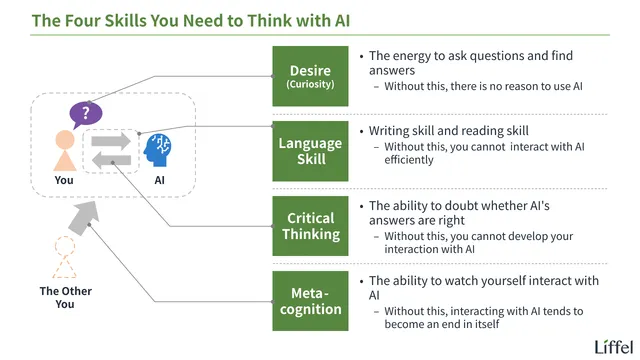
With that, the basic preparation is complete. Next, let’s consider what kinds of skills are needed to think with AI.
For other AI-related entries, see below.
Footnotes
-
Note that the term “custom AI” is not yet widely established. Since no settled term exists, this entry uses “custom AI” as a convenient label. ↩
-
ChatGPT and Gemini both offer a “memory feature” that retains content across threads, but if you care about response quality, writing the background out is still the way to go. ↩