
This entry considers how we should enter text in the age of AI: by typing or by voice.
Voice input today is remarkably good. Speaking is far faster than typing, and there are now AI tools that turn spoken words into clean, well-formed sentences. Some people may be wondering whether keyboards are still necessary. In fact, more and more well-known people are saying that switching to voice input has made them more productive. Let’s think this through.
That said, there are situations where voice input is perfectly fine. I’ll cover those as well.
Let’s begin.
toc
Typing vs. Voice Input
First, let’s compare the two.
The basic premise of this comparison is that AI cleans up the text either way. Whichever method you use, the result will contain no typos, and voice input will contain no filler such as “um” or “uh.” Without this premise, the comparison would end with “voice input takes too much cleanup to be practical.” Since those days are over, I’ll compare the two as they stand in the age of AI.
Take a look at the table below.
| Typing (keyboard) | Voice | |
|---|---|---|
| Output speed | △: No amount of practice will make it as fast as voice | ◯: Overwhelmingly fast |
| Quality of the text produced | ◯: You revise as you write | ✕: Whatever comes to mind goes straight into the text |
| Ease of editing | ◯: You can edit precisely where you need to | ✕: Too much effort to be realistic |
| Bullet points and other formatting | ◯: Possible | ✕: Practically impossible |
What this shows is that writing that will eventually be shown to others, and judged on its quality, requires typing in the end. Good writing that you can show to others takes editing and often complex formatting. Even the table above could not have been made without typing.
Of course, if you are fully prepared to say, “I will only give AI instructions and will never touch the text myself, even for the final polish,” the picture changes. However, since I find it very hard to believe that this approach can produce high-quality writing, I’ll leave it out of this entry.
When to Use Voice Input
Put another way, voice input still makes sense in only two cases:
- Writing that no one else will see, or that will not be judged on its quality even if someone does
- The first phase of writing that will eventually be shown to others and judged on its quality
Let’s look at each in turn.
Case 1: Writing That Won’t Be Seen, or Won’t Be Judged on Quality
First, for writing that no one else will see, or that will not be judged on its quality, voice input has the edge. Typical examples include:
- Personal communication
- Messages sent from your smartphone, for example
- Email (short replies, or messages to people you already know well)
- Something like “Got it — that date works for me” can be dictated, even in a business email
- Emails where the wording affects the outcome, such as requests, refusals, and proposals, count as writing that is judged on its quality
- How much loss of quality you can accept depends, of course, on your relationship with the recipient
- Personal notes (especially brainstorming)
- Generating ideas
- Prompts for AI
In these cases, the conclusion is that voice input generally has the edge. Since the quality of the writing doesn’t matter much, the speed of voice input wins.
Messaging apps such as LINE in particular have long been moving toward the style of spoken conversation, with speech bubbles and stickers, and we are used to that. You could even argue that voice input, which keeps your words lively and spontaneous, suits them better. When speaking aloud won’t bother anyone around you, voice input seems perfectly fine.
Is Voice Input Good for Prompts?
The one exception is the last item, prompts for AI. I haven’t yet decided whether voice input really has the edge there.
Articles and videos promoting voice input almost always cite this use as a reason to switch. No one else sees your prompts, and AI understands what you mean even if there are a few typos or missing words. The argument, then, is that you should prioritize the speed of voice input.
In my experience, however, I get more out of AI overall when I draft the prompt by typing, look it over, and then paste it in. Here’s why:
- After writing something down, I often decide that part of it does not need to be said
- Things go better when you leave out what you don’t need to say (especially early in a discussion)
- Once you mention a specific service or product name, AI tends to latch onto it
- Things go better when you leave out what you don’t need to say (especially early in a discussion)
- Writing seems to be a way of double-checking my own thinking
In short, my current view is that a slow exchange with 100-point prompts is better than a fast exchange with 75-point prompts. This is only one opinion, though. Try both and adopt whichever method works for you.
Case 2: The First Phase of Writing That Will Be Shown and Judged on Quality
The other possible use is the first phase of writing that will eventually be shown to others and judged on its quality. You get everything out by voice in one go, then edit it afterward with AI and the keyboard. A while back, many people promoted voice input for exactly this purpose.
Bottom line: I don’t recommend this approach. The reason is simple: I believe it lowers the quality of the writing.
I have tried it myself, and the quality of my writing clearly dropped. Three times, I have also observed the three cases of quality decline of those who switched to voice input. Although the sample is small, three out of three is hard to dismiss as coincidence.
Why Does Voice Input Lower the Quality of Writing?
My hypothesis (and I’m fairly sure of it) is that starting with voice input lowers the quality because the structure never gets properly worked out.
When you write, the finished version almost never comes out on the first try. You write something, read it back, and fix it: “this order is backward,” “this word doesn’t say enough.” Only through that process do you see what you really wanted to say. In other words, revising (editing) is itself the process of building your thinking.
Voice input, however, only lays things out in the order you said them. Whatever comes to mind turns straight into words.
You might object, “Since I’ll edit it later with AI and the keyboard, that shouldn’t be a problem.” That’s a fair point. In practice, though, you end up anchored to what you first said aloud.
Although there are several possible reasons for this, the biggest is probably that you want to use the words you’ve already produced. Even though you were just rambling into a microphone, once it is on the page as text, part of you wants to make use of it somewhere.
What’s more, you can’t count on AI to help here. As you probably know, AI won’t say, “This part is just rambling and frankly worthless. Let’s cut all of it.” It always treats what we have produced with the utmost respect.1
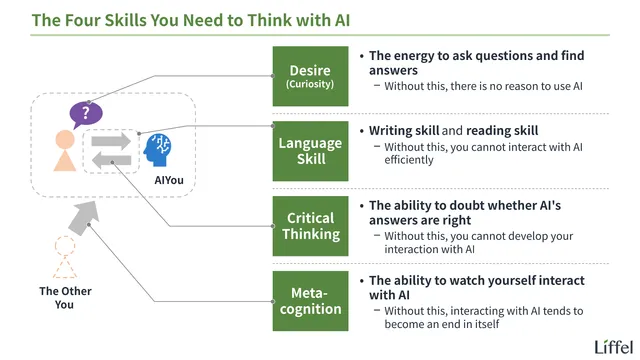
So even when AI polishes the text for you, the problem isn’t solved; it just becomes invisible. For how to avoid blindly trusting AI, see also the entry below.

Another factor is that when you can get so much out by voice in one go, there is too much of it to restructure.
All three cases I mentioned above showed this symptom. Their outputs read as if the spoken words had simply been poured onto the page, and they no longer felt as sharp as before.
What Is the Real Bottleneck?
Ultimately, my view is that the real rate-limiting step (the slowest step, which sets the pace of the whole process) is not “how fast you can output text” but “how fast you can think.”
And what sets the speed of thinking is not “how fast you can turn thoughts into words and text,” but “the time you spend looking at the text you’ve produced and thinking it over.” Since that takes the most time, speeding up the initial output with voice input changes nothing essential, and may even make things worse.
My own experience convinces me of this, and the fact that voice input has not caught on all that widely seems consistent with it.
Everyone Should Learn Touch Typing
To sum up, my view is that even in the age of AI, typing will remain the main way we enter text. Although voice input is convenient and will keep getting better, I don’t think it will replace typing.
That is why this site’s position is that touch typing is a skill everyone should learn. There are three reasons:
- It takes only a few dozen hours to learn, and once learned, it never goes out of date. Unlike how to operate a particular app, it stays useful even when the software changes
- Even if voice input becomes far more important in the future, all you lose is a few dozen hours
- Typing with your thumbs on a smartphone is no substitute
- Although thumb typing is enough for short messages, composing and revising long pieces of writing is hard without a keyboard
I also don’t think this is a skill only for people aiming at white-collar work. Writing out your thoughts and feelings at length and then reflecting on them carefully is something we can fairly call a basic human ability, regardless of occupation. Education in the age of AI should value exactly that kind of ability.
If you want children to learn it, elementary school is a good time. Once a self-taught habit sets in, such as looking at the keys or typing with two fingers, unlearning it is harder than learning from scratch.
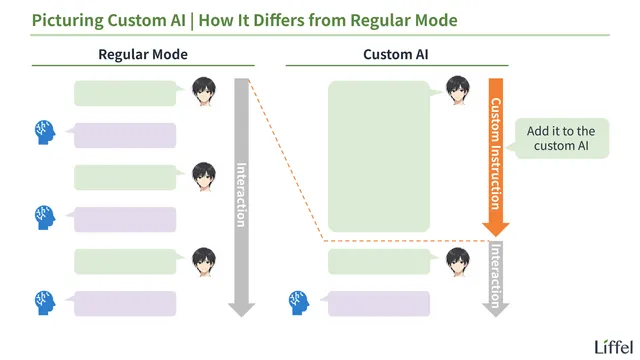
That covers the differences between typing and voice input. Next, let’s return to the main thread and learn about the “custom AI” mentioned in the previous entry.
You can find all AI-related entries below.
Footnotes
-
If you ask it to “cut ruthlessly,” it will trim things. What it trims, however, is only surface-level waste such as repetition and digressions. The standard for deciding which parts were just rambling and which parts you really meant exists only on our side. ↩