This article examines the differences among the major LLMs (ChatGPT, Gemini, and Claude), and how to use them appropriately.
toc
Setting the Stage
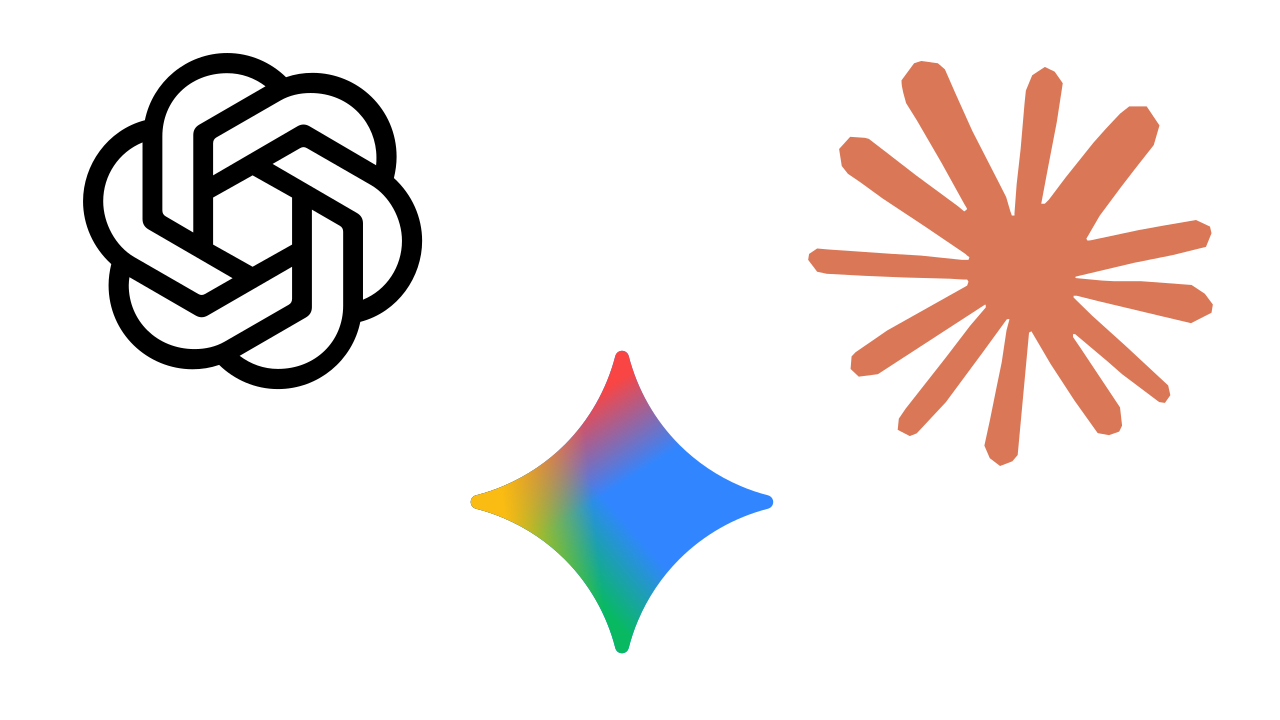
First, let me lay out the assumptions. The three AIs in this comparison are:
From here on, these three together will be called the Big Three LLMs, so keep that label in mind.
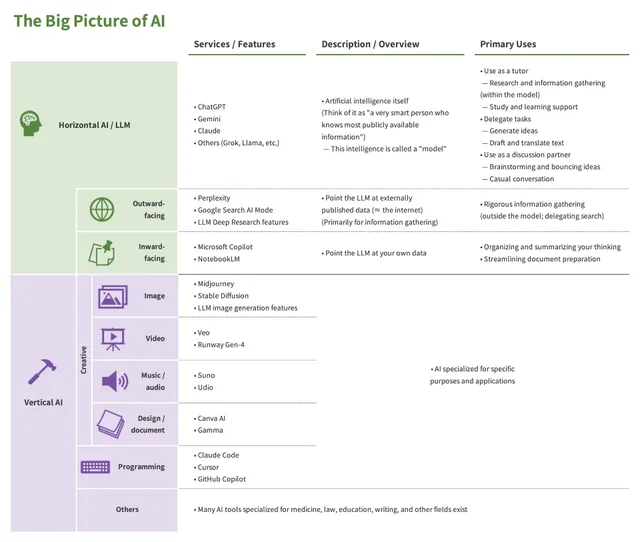
For more on what other kinds of AI exist, and what an “LLM” actually is, see the article below.
Conditions of Comparison
Next, note that this comparison is made under the following two conditions.
- Comparison within what is available for free
- Personal opinion
First, this is a comparison within what is available for free. Including paid models would change parts of the picture, but paying for all three of the Big Three LLMs is not realistic for most people. To compare them fairly, the scope here is limited to what is freely available.
I will try to update this article frequently, but even so, be aware of when the information is from (see the modification date at the top). AI is evolving at remarkable speed, and each company changes its services frequently. What is written here may no longer be accurate by the time you read it.
Second, this is based on impressions from my own usage (obviously). An LLM is, in essence, a generalist, so how people use it varies enormously. For reference, here is how I use them.
- I basically only use them on a computer (not on a smartphone)
- I draft my prompts (the input given to the AI) in advance, usually writing at least 100 characters (in Japanese)
- In particular, I avoid asking only a question; I also write out the answer I have in mind
- Rough breakdown of use cases
- Gathering information and looking things up (how to use tools, etc.): 40%
- Discussion
- Idea-based discussions: 30%
- Discussions based on my own work: 30%
That said, dwelling on these caveats prevents progress, so I will simply write what I have found in practice. Whether it applies to you is something only you can confirm by trying the tools yourself.
How to Use Claude
The role of Claude is straightforward. See the table below.
| ChatGPT | Gemini | Claude | |
|---|---|---|---|
| When you exceed the free tier | Switches to a less capable model | Becomes completely unavailable for a period of time | |
| Free tier | Effectively none (you fall back to a less capable model) | Clearly defined, and notably small | |
As the table shows, Claude is the only one of the Big Three with the policy that once you exceed the free tier, it becomes completely unavailable for a period of time. Moreover, the free tier itself is quite small. Roughly, you hit the limit after about ten exchanges in a single day (when you give it long texts to read and have substantive back-and-forth).
The implication is that Claude should be reserved for Claude-only tasks — things only Claude can do, or that Claude does best1.
Claude-Only Tasks
So what counts as a Claude-only task?
It is discussion based on files you upload (text documents or Excel spreadsheets)2. Specifically, you upload a manuscript or a table and ask Claude to do things like the following.
- Content checks
- Are there any errors?
- Is anything missing that should also be discussed?
- Editorial checks
- Are there typos or omissions?
- Are there expressions that carry unnecessary risk?
In my experience, Claude is a step ahead of the others for this purpose. ChatGPT and Gemini handle “what you write in the chat box” well enough, but they struggle once a file is uploaded. The problem is especially pronounced with long texts: they often fail to read the file at all, or read things that are not actually there. This article, of course, was checked by Claude before publication.
NotebookLM (covered in the article introduced earlier) is also unsuitable for this purpose. NotebookLM is excellent at reading uploaded files accurately, but it has a pronounced tendency to treat the content as authoritative and reorganize it for explanation. It works well for explaining the content of a textbook, but it does not work when you want to discuss the content itself and improve the file you uploaded.
There may be other Claude-only tasks beyond long-text processing, but in the end, finding your own “Claude-only use case” is the dividing line in deciding whether or not to use Claude. Without such a use case, Claude becomes simply “an LLM with strict usage limits,” with no advantage over ChatGPT or Gemini.
How to Choose Between ChatGPT and Gemini
That leaves how to choose between ChatGPT and Gemini, and my view is simple: use both. There is effectively no usage limit, after all. Here is the table again.
| ChatGPT | Gemini | Claude | |
|---|---|---|---|
| When you exceed the free tier | Switches to a less capable model | Becomes completely unavailable for a period of time | |
| Free tier | Effectively none (you fall back to a less capable model) | Clearly defined, and notably small | |
In particular, since AI carries the risk of hallucination, relying on a single AI for the answer is dangerous. With “at least two” as a baseline, ChatGPT and Gemini fit that role well. I personally split my screen in half and paste the same prompt into both.
Strengths and Weaknesses of ChatGPT and Gemini
If pressed to identify their strengths and weaknesses, my impression is as follows.
| ChatGPT | Gemini | |
|---|---|---|
| Strengths | • Occasionally produces genuinely insightful remarks (the model itself is strong) | • Strong on current events • Most up-to-date and accurate on information likely to appear on YouTube or the web (e.g., how to use tools) • Customization features (Gems) are available for free |
| Weaknesses | • Responses are too long • A pronounced tendency to drag out the exchange | • For better or worse, gives only safe, conventional answers |
Until recently, the biggest difference between the two was the memory feature (which retains exchanges across separate conversations). Only ChatGPT had this feature, which gave it the tendency to understand you more deeply the more you used it, and return more accurate answers as a result. However, in March 2026, Gemini also gained a memory feature, so this is no longer a distinguishing point.
Given that, the biggest differentiator now is whether customization features are available for free, and on this point the edge goes to Gemini (though I end up using both anyway). Customization features are covered in detail in the next article.
That covers a brief comparison of the Big Three LLMs. At the very least, one thing is beyond doubt: every one of these is worth trying at least once. Try them, find your own way to use them, and do not feel obliged to settle on just one.
The next article covers the customization features mentioned at the end here.
A full list of AI-related articles is available here.