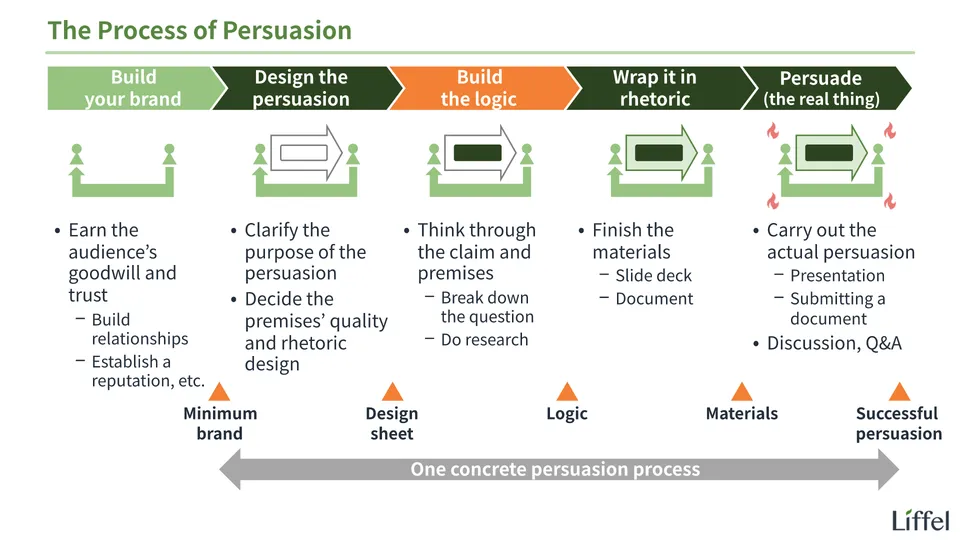
In this entry, let’s learn how to build the logic of a presentation (persuasion). It answers questions like these:
- What does it mean to “build the logic” of a presentation (persuasion)?
- What exactly is the output?
- What are the key points when creating it?
- What app should you use to create it?
Note that “logic” here means the same thing as “outline.” From here on, I’ll use “logic” throughout.
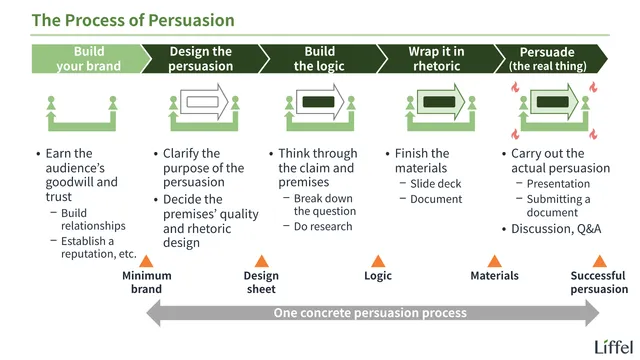
Also, this entry is easier to understand if you’ve first learned the big picture of presentation (persuasion). If you have time, read the entry below first.

Let’s begin.
toc
What Does “Building the Logic” Mean?
Let’s start with the conclusion. “Building the logic” means creating a text file like the one below.
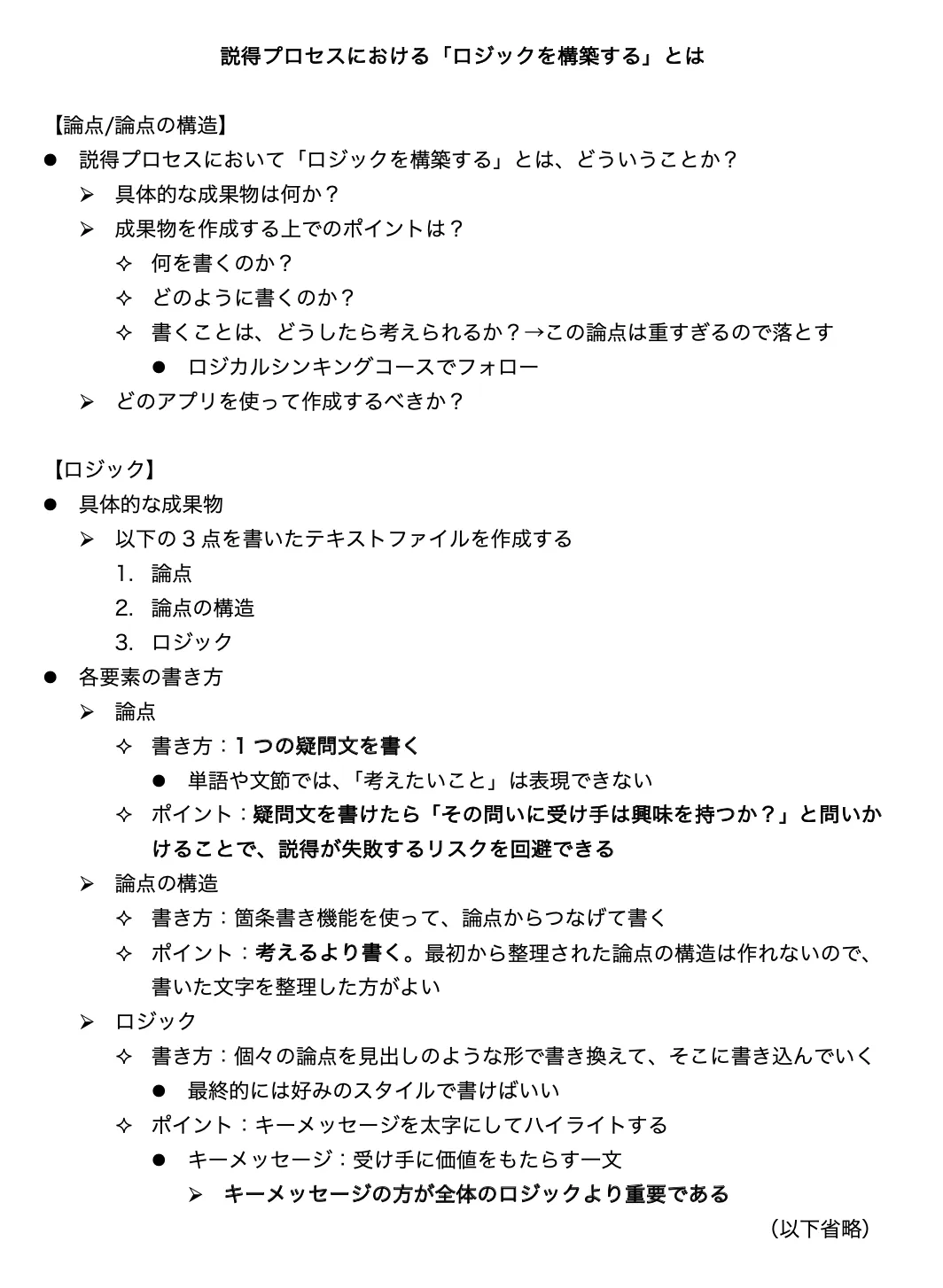
As shown, what you create in the “build the logic” step is a single text file. Creating this output is the goal of this step.
Incidentally, this is the logic of this very entry. What you’re reading now is that logic wrapped in the medium of a “website entry.” Below is the same logic wrapped in the medium of a “slide deck” (in Japanese). Compare the two.
*Depending on your device or browser, the PDF may not display. In that case, download it with the button below.
What to Write in the Text File
So what should you write in this text file?
In short, you need the following three elements:
- The question
- The structure of the question
- The logic (claim and premises)
Before going through them, though, there’s one important caveat.
A Caveat
This entry doesn’t explain “how to come up with this content”. That’s because coming up with excellent logic requires mastering, at the very least, a broad range of skills and abilities like these:
- Thinking methods
- Skills such as critical thinking (in Japanese)
- What thinking methods are, and their types (in Japanese)
- Research methods
- Since premises are gathered through research, you need to learn proper research methods
- What research is: the big picture (in Japanese)
- Statistics
- Building highly valid premises requires knowledge of statistics
- What universal premises are (in Japanese)
- The foundations of reasoning (something different from critical thinking as a method)
- That is, mathematical grounding and language ability (reading and writing)
Since these extend all the way to things like math in compulsory education, as you can see, there’s no way this entry could cover them all. Where this site has related entries, I’ve linked them, so read them if you’re interested.
What’s more, the most important thing in building excellent logic is probably inspiration (coming up with a promising question or hypothesis), and I don’t think that’s a skill you can learn from others. Although effort can improve it to some extent, there’s no denying that talent plays a large part.
To sum up, there’s a lot to learn before you can come up with excellent logic, and even learning it all doesn’t guarantee that you will.
For these reasons, this entry explains only “how to write the text file above, and what to check.” Please keep that in mind.
Element #1: The Question
Back to the topic: let’s look at the file in detail. Here it is again.
First, you write the question. The question is the single interrogative sentence you answer through your presentation. You could also call it the theme of the presentation.
Question: the single interrogative sentence you answer through your presentation (the theme of the presentation)
How to Write the Question
Writing the question is simple. Write a single interrogative sentence.
No question (what you want to think about) becomes concrete unless you write it as an interrogative sentence. It absolutely has to be one. If you can’t write your question as an interrogative sentence (= it ends up as a noun or a phrase), you don’t understand your question. Don’t move on until you can.
Once you’ve written the interrogative sentence, ask yourself the following:
“Am I confident that my audience will be interested in this question?”
If the answer isn’t “yes,” again, don’t move on. Change the question. A presentation can’t work on a question the audience isn’t interested in.
Exercise
Let’s do an exercise.
What is the question of this entry? Write it as an interrogative sentence.
Write your answer in the box below.
What does it mean to “build the logic” of a presentation (persuasion)?
*Because this question is too big, the “structure of the question,” explained next, becomes necessary.
Element #2: The Structure of the Question
Once the question is set, next you create the structure of the question.
Questions big enough to be the theme of persuasion with materials either can’t be answered directly or, even if they can, tend to lead to abstract answers. So you break the question down and make a list of smaller, more concrete questions that are easier to answer (sub-questions). This is the structure of the question.
Break down the question to create the structure of the question
How to Write the Structure of the Question
Write the structure of the question using bullet points, branching from the question.
Below is the part of the text file shown earlier that corresponds to the structure of the question. Check how it’s written.
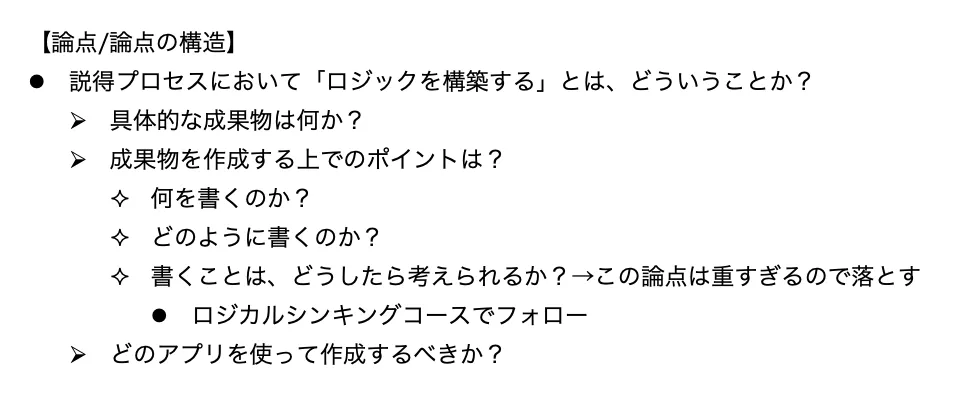
To use bullet points, press the bullet button on the toolbar (in Word). In other apps, type a hyphen (”-”) followed by a space, write your sentence, and press Enter. It should automatically turn into a bulleted list.
Once you’re in a bulleted list, press Tab (at the upper left of the keyboard) to go down a level, and Shift + Tab to go back up. Adjust the levels this way to visualize how the questions relate.
This used to be the hardest part. Creating the structure of a question is a core skill of critical thinking, and learning to break questions down properly took time.
In the AI era, however, you can rely on AI to break down questions. AI knows all the major frameworks (patterns for breaking things down) and can produce several breakdowns in an instant. If you get stuck, ask AI.
To be honest, though, I’m not sure how far to recommend this approach of “having AI break down the question.” Although it’s overwhelmingly efficient, I suspect that if you rely on AI from the start, you’ll never learn to break questions down yourself. At present, AI’s breakdowns also tend to lean too far toward covering everything while ignoring overlaps, so an approach that relies entirely on AI probably has its limits.
If You Want to Do It Yourself
Here is an approach for those who want to work it out themselves (the content is a little dated).
The trick is to write rather than think in your head. Write down every interrogative sentence that branches off from the question, every “question whose answer would please the audience.” Writing brings even more questions to mind. Really. Since you can tidy up the structure with Tab later, start by writing a lot.
If even that’s hard, just write down everything you want to convey in this presentation. Then work backward from the table below to find what question each one answers. Think of it as tracing the table from right to left. Doing this should show you what questions you’re actually thinking about.
To repeat: what matters most is writing. Don’t get this wrong. Only geniuses can think everything through neatly before putting it into words. The rest of us reach the goal faster by thinking while looking at the words we’ve written. Just start writing.
Breaking down questions is explained in detail in the Critical Thinking category. See it as well.

Exercise
What is the structure of the question of this entry?
There’s an answer box below, but bullet points don’t work in it. If you can, open your own notes app and try out its bullet point feature (although some apps may not have one).
- What does it mean to “build the logic” of a presentation?
- What exactly is the output?
- What are the key points when creating it?
- What do you write?
- How do you write each item?
- How can you come up with what to write for each item?
- What app should you use to create it?
The beginning of this entry shows the structure of the question, but it’s simpler than this answer (the third level is left out). That’s because conveying the detailed structure you built for yourself to the audience as is, right at the start, would be hard to follow.
Element #3: The Logic
Once you’ve written the structure of the question, next write the logic. The logic is the answer to the question. Within it, the direct answer to the question is the claim, and the reasons the claim is right are the premises. Here is a slide from the Critical Thinking category.
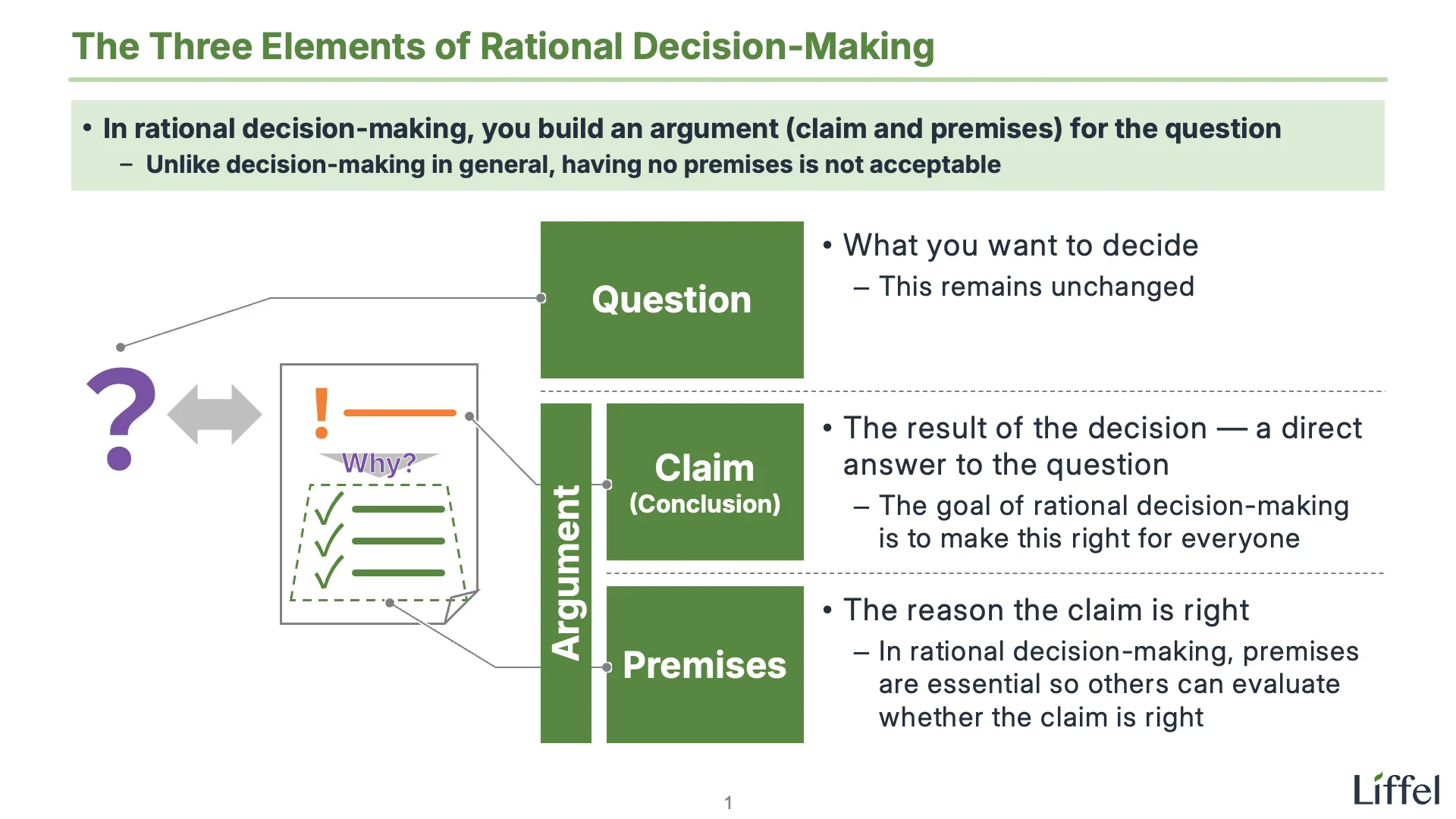
A presentation can’t end with just posing a question. The audience wants to hear the answer you came up with. Write it down.
Incidentally, although I’ve said casually here, “once you’ve written the structure of the question, next write the logic,” in reality it takes a great deal of effort and time to get from setting the question to finishing the logic. That’s perfectly normal, so don’t worry.
If you find building the logic easy, you should suspect the question itself. A question that can be answered easily is unlikely to bring the audience any value.
In other words, the source of your presentation’s value is showing an answer to a question that can’t be answered easily. Put most of your time here, and come up with logic that impresses the audience.
How to Write the Logic
Until you get used to it, I recommend writing the logic by “turning the interrogative sentences from the structure of the question into something like headings, and writing the content under them as bullet points.” Take a look at the relevant part.
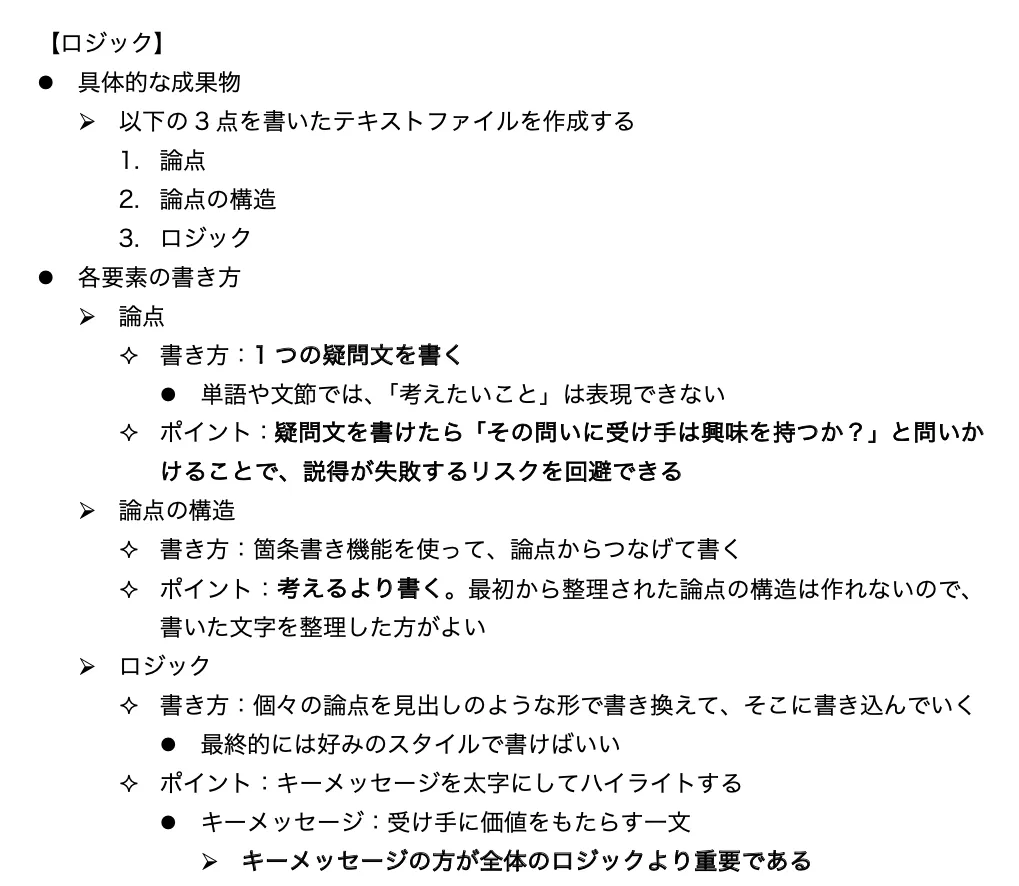
Once you’re used to it, look for a style that’s easy for you to write in. Writing the answer after each interrogative sentence from the structure of the question, using ”→” or the like, also works.
Whatever style you use, though, highlight your key messages in bold. A key message is a sentence that will make the audience go “Wow!” (and that you’re confident will). In other words, it’s a sentence that has value for the audience. It can be the claim or part of the premises.
Key message: a sentence that brings the audience value
To check whether a sentence is a key message, answer the following questions:
- Is it something the audience doesn’t know?
- Does it contradict the audience’s common sense (what they naturally consider “right”)?
- Does it settle something the audience isn’t sure about?
This is obvious if you think about it the other way around. Telling the audience something they already know, already accept as right, or are already sure of can’t give them anything of value1. To bring the audience value, you need to say something else.
The reason to highlight key messages is that key messages matter more than the logic as a whole.
Having no key message means the logic contains nothing new for the audience. However neatly the logic hangs together, it can’t create any value.
Conversely, if you can prepare even one key message, the presentation is likely to succeed even if the overall logic has some rough edges. In the end, what makes an impact on the audience isn’t the overall story but a sentence that packs a punch.
Highlight your key messages and check whether you’ve prepared a knockout punch. If you can’t highlight anything, the cause and the way forward are one of the following:
- Your thinking or research is too shallow → work harder (give the logic another twist)
- You chose the wrong question (one that can’t produce new logic) → the only option is to start over from the question
Needless to say, the painful case is choosing the wrong question, since you’re back to square one. Do your design properly before building the logic.
Apps for Creating the Text File
Finally, let’s think about apps for creating this text file.
The text file shown as an example so far was created in Word. I chose Word because ① it’s the most widely used document app, and ② as another Microsoft product, it makes the contrast with PowerPoint easy to see. If you’re a beginner, starting with Word is fine.
Looking only at functional requirements, however, you can create this text file with any app that has these three features:
- You can write a lot of text
- It has bullet points, so you can create a hierarchy of sentences
- It can highlight text, such as with bold
Almost every app that handles text has these features.
Conversely, if these are all you need, Word, which lets you set paper size and margins and create documents as finished products, is overkill. Although being overkill would be fine on its own, it also gives Word drawbacks: it’s “heavy (slow to launch),” and “text tends to lose its formatting when copied into other apps.”
So once you’re used to it, you’re better off using an app other than Word. This is especially true if you choose slide decks as your final medium.
Here are my comments on candidate apps and features. I hope you find them useful.
Recommended: A Markdown Editor
My conclusion is that in the AI era, a Markdown editor will be the only real choice for experienced users.
The reason is simply that, in the AI era, the most important requirement for an app is being able to build the logic together with AI. Specifically, it’s an app that meets the following requirements:
- You can edit at any time, and AI sees your changes immediately
- It needs to save the moment you edit
- AI can edit at any time, and its changes show up on screen immediately
- This isn’t possible with the app alone; you also need to turn your AI into an agent
- It handles files with the .txt or .md extension
- That way, there’s no chance AI can’t handle them
- You can easily switch AIs and apps
A Markdown editor meets all of these. For an explanation of Markdown editors, see the entry below.

Not Recommended #1: Email Apps
From here on are apps I don’t recommend. First, I don’t really recommend email apps (writing your logic in a draft email with no recipient).
The reason is simple: emails arrive while you’re building your logic (unless you disconnect from the internet). While building your logic, or indeed during any work that requires concentration, you shouldn’t have your email app open.
That said, an email app does have the advantage that “you can share the logic as is.” Since it has no notable drawbacks other than incoming email, writing your logic in an email app might be an option if you work somewhere where instant replies are expected and closing your email app is unthinkable.
For ease of sharing and editing as a team, however, saving a document app file (Word or Google Docs) to the cloud is more convenient. In the end, since email apps have no real advantage, there’s no reason to choose one.
Not Recommended #2: PowerPoint’s Outline View
Finally, I don’t recommend PowerPoint’s “Outline View” either. Unlike email apps, I don’t recommend it at all.
“Outline View” is a feature that changes the left side of PowerPoint from slide thumbnails to the slides’ logic. Check the image below.
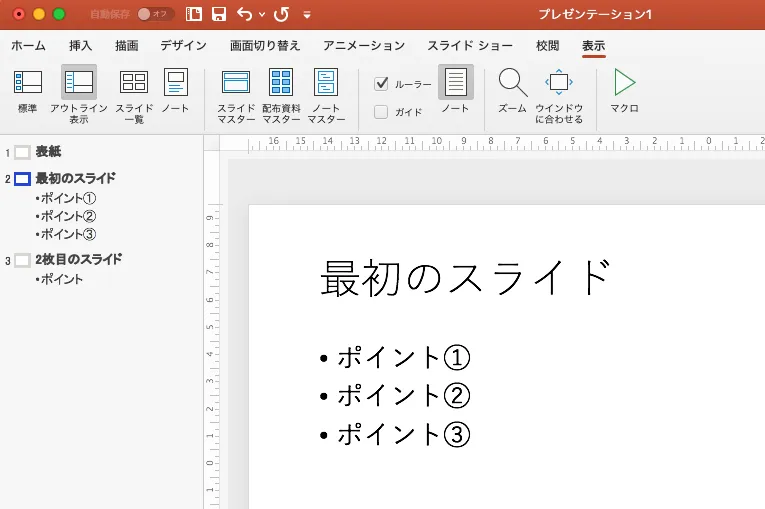
Books that cover all of PowerPoint’s features often say things like “Use Outline View to plan the structure of your presentation.”
As you can see, however, this feature ties the logic to individual slides. “What to convey on each slide” is something to think about after you’ve decided “what to convey overall,” not at the start.
And once “what to convey overall” is in your text file, you can decide “what to convey on each slide” just by dividing it up. There’s no reason to bother with Outline View. What’s more, this feature writes bullet points onto your slides, which you then have to delete when you visualize the slides later.
When you create a slide deck following the persuasion process, there’s no point from start to finish at which you should use Outline View.
Outline View might be useful only in the extremely unusual case where “the logic is already fairly well organized in your head, and the deck will consist entirely of bullet-point slides.” Whether a feature exists and whether you should use it are two different things. Build your logic in an app that handles text.
That covers logic (how to write it and what to check).
As I said, understanding this content alone won’t let you build logic. Don’t forget to learn a range of skills, put them into practice, and build logic again and again.
All presentation-related entries are collected below.

Footnotes
-
This applies to logical presentations, however. In empathy-based presentations, value comes from affirming the audience, so use whichever fits. ↩