This entry gives an overview of what AI can and cannot do.
toc
- What AI Can Do: The Big Picture
- What AI Can Do #1: Chatting
- What AI Can Do #2: Asking for Answers (Replacing the Internet)
- What AI Can Do #3: Discussing and Thinking Together
- What AI Can Do #4: Communicating Your Thinking
- What AI Can Do #5: Having It Do Work
- What AI Can Do #6: Generating Non-Text Media
What AI Can Do: The Big Picture
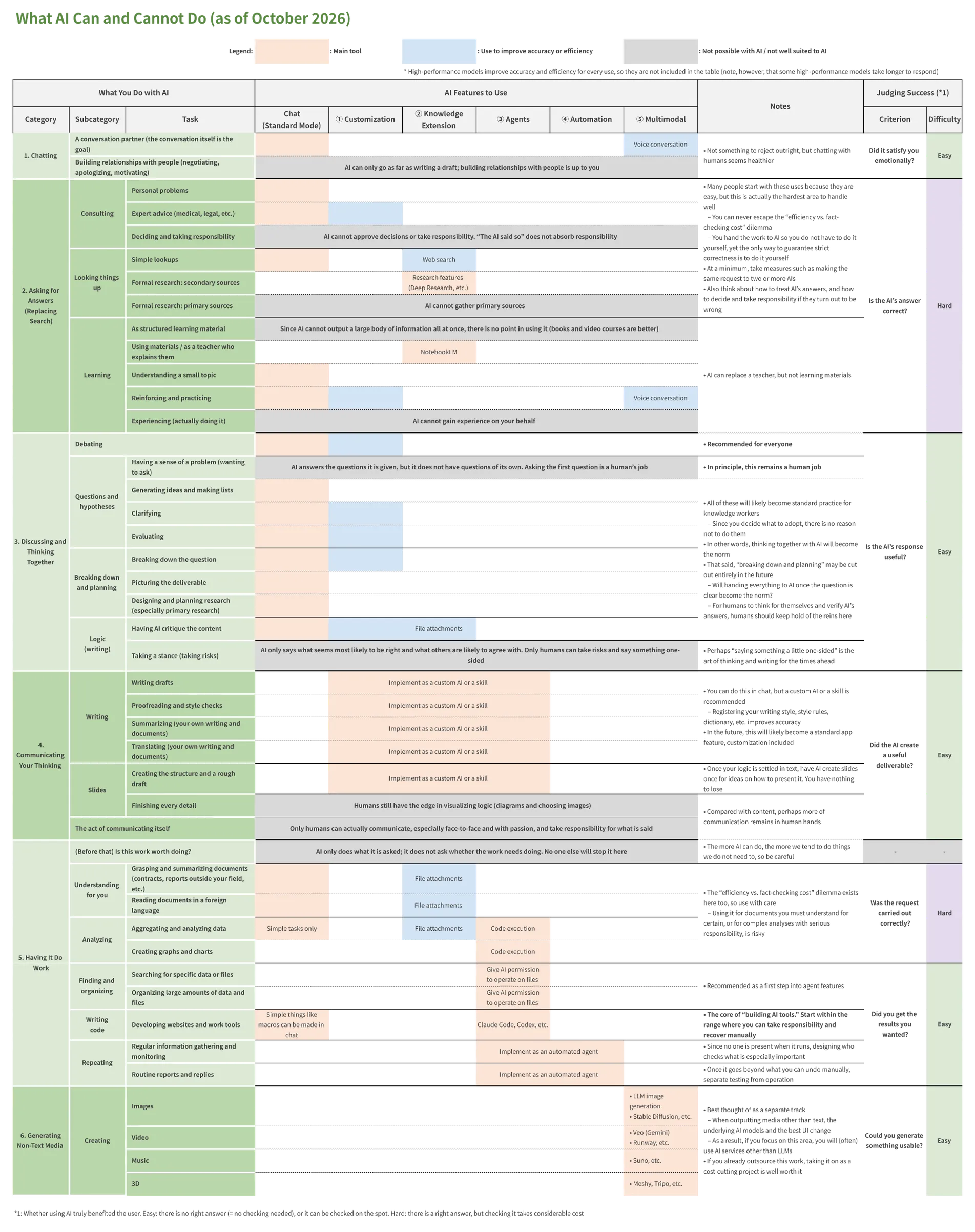
Let us get straight to it. I have summarized what AI can and cannot do in the table below.
Since covering every possible use is not realistic, the table focuses on the uses that appeal to businesspeople who have been working with Microsoft apps. Please keep that in mind.
As you can see, it is quite large. If it is hard to read on screen, download the Excel file with the button below.
How to Read the Table
The table is structured as follows:
- Vertical axis: what AI can and cannot do, grouped by category
- Horizontal axis: the AI features you need to use for each task
- Where the major LLMs (ChatGPT, Gemini, Claude, etc.) cannot handle a task, the column shows another AI service instead
- “Judging success” is explained later
Broadly speaking, the uses are listed from simplest (those that stay within a chat and need no extra features) to most advanced.
That said, rather than working through the uses from the top to get used to AI, I recommend starting with the uses that look most beneficial to you and learning the features they require along the way.
Although this entry does not explain the horizontal axis (AI features) in detail, learning to use these features does not take much effort. An hour is enough to get the gist, and most of them become clear once you use them.
In fact, since you cannot really understand them without using them, the only option is to start using them.
When it comes to AI, the biggest waste is thinking, “The advanced features look confusing, so I will stick to what I can do in a chat.” If something is unclear, you can simply ask the AI about that too, so just give it a try.
Key Points
Since explaining the table in detail would take a while, here are the key points first:
- Use AI for at least one of the purposes under “3. Discussing and thinking together”
- “2. Asking for answers” is easy to use but hard to use well
- My recommendation is debating with AI
- Anyone can do it, and it develops the skills you need in the AI era
- You should also keep in mind what AI cannot do
- Right now, being good at using AI is still a strength, but eventually anyone will be able to do what AI can do
- In the medium to long term, it may become hard to stand out unless you differentiate yourself with what only humans can do
What AI Can Do #1: Chatting
From here, let us go through the table from the top, one major category at a time.
We start with chatting. In short, this means talking with AI for its own sake (the exchange itself is the goal). Examples include:
- Typing “Hello!” the first time you use AI
- Typing something like “Here is what happened today”
Since this is just conversation, there is no need for any features beyond chat. At most, you might use voice input or voice conversation when typing feels like a hassle.
Although I have never used AI this way myself, published data suggests that a small share of usage does fall into this category.
Frankly, I do not think it is a healthy way to use AI. Still, it does not feel right to comment on something I do not do myself, so I will leave it at that.
What AI Can Do #2: Asking for Answers (Replacing the Internet)
Next is asking for answers. The subcategories here are:
- Consulting
- Looking things up
- Learning
Roughly speaking, think of these as replacements for, and upgrades of, what we used to ask the internet (search engines and Q&A sites).
For many people, these are the main uses of AI. Since most of them can be done with AI’s standard features (at most, file attachments or Deep Research), this is the category where the benefits of AI are easiest to feel.
The Problems with Asking AI for Answers
However, I believe you should not use AI only for this purpose, for the following three reasons:
- It increases the risk of doing whatever the AI tells you
- You cannot escape the fact-checking dilemma
- It underestimates what AI can be
Let me explain each in turn.
Problem #1: It Increases the Risk of Doing Whatever the AI Tells You
First, the more you use AI to get answers, the greater the risk that you will simply do whatever it tells you.
The reason is simple: “asking for answers” basically means accepting the AI’s response as correct. In fact, I grouped the uses that work this way into this category.
In other words, in these uses, we are below and the AI is above. We ask an all-knowing AI to tell us the right answer.
If that is the only way you use AI, at some point the AI will become a god in your mind.
If what that god says were always truly right, that might not be so bad. But that is not the case today, and we do not know whether it ever will be. For now, encouraging this tendency can only be called a risk.
If you only ever ask AI for answers, the AI becomes a god
So my view is that asking for answers should make up at most about half of your AI use, and the other half should be uses where you stand on equal terms with the AI.
Problem #2: You Cannot Escape the Fact-Checking Dilemma
Of course, even when asking for answers, if you ask several AIs the same question, or look things up another way whenever something seems off, it is fair to say you are not treating AI as a god. At the very least, I recommend making a habit of always asking more than one AI when you consult or look something up.
However, such measures are hard to put into practice, and they will only get harder as AI gets smarter.
The reason is that we ask AI for answers precisely because we want to save effort. We started asking AI for answers because it was easier than the methods we used before and its answers seemed right. Back when AI was not as smart as it is now, nobody thought of asking it for answers.
In other words, the reason we ask AI for answers is that it gets us to the right answer with little effort. If we then doubt its answers or fact-check them thoroughly, there is no point in using AI in the first place.
At the same time, it is also true that we have not yet reached the stage where AI’s answers can be treated as absolutely right.
This is why “judging success” (whether using AI actually benefited the user) is marked “Hard” in the table. For AI to benefit us in this category, the AI’s answers need to be right, and that is not easy to judge.
To sum up, the problem is this: to save effort by asking AI for answers, you have to assume that the AI’s answers are right, but you cannot know whether that assumption holds. The only way to resolve this is to look for the answer by means other than AI, which contradicts the original motivation of reaching the right answer with little effort. That is the dilemma.
Incidentally, although this problem also exists on the internet, people there have reached a consensus on judging the reliability of information by its source (for example, information on government websites is regarded as highly reliable). Also, since everyone sees the same information on the internet, unreliable or useless information tends to be weeded out (becomes hard to find) in the medium to long term. Since AI, on the other hand, creates on the spot a unique piece of information that only the user sees, the problem has become more serious.
As far as I know, there is no way to solve this dilemma at its root. Although I suspect the general direction is to treat the AI’s answers as right and accept the risk and cost of their being wrong (adjusting that judgment to the scale and impact of the decision), we will need to wait and see for a while.
Problem #3: It Underestimates What AI Can Be
Finally, if you only use AI to get answers, you are greatly underestimating what AI can be.
As I explain below, AI can also take on roles other than replacing the internet. In my experience, the impact is greater when I use it in those roles. You will make better use of AI if you think of it not as “a replacement for the internet” but as “an extremely capable person without a body.”
Think of AI not as “a replacement for the internet” but as “an extremely capable person without a body”
In other words, anything that does not require access to the physical world can likely be handed to AI. Even what is not possible yet will often become possible within a few years. Be careful: if your understanding is off here, you will fall behind in using AI.
Although AI that can access the physical world, called “physical AI,” is also attracting attention, I will leave it outside the scope of this entry.
What AI Can Do #3: Discussing and Thinking Together
Next is discussing and thinking together. In contrast to the previous category, this one covers uses where you can work with AI on equal terms. Specifically:
- Debating
- Setting questions and hypotheses
- Breaking down problems and planning
- Building and improving your own logic (writing)
In these uses, what you are thinking about has no absolutely correct answer (= you can judge success subjectively). Also, by the time you try to use AI this way, you should already be in charge of the thinking. You can treat the AI as an equal thinking partner.
In other words, this is the category where you treat AI not as a god but as a sparring partner.
Start with AI Debate
As I said above, I do not recommend relying heavily on AI to get answers. So if you are going to use AI, I recommend first increasing your use in this category.
That said, it may be hard for students to always have some question to think about, and many working professionals are busy with routine work.
That is where I recommend AI debate.
With AI debate, you do not need to prepare your own question. Simply decide to do it and follow through, and you will have taken a meaningful first step in using AI. You will also learn to use custom AI, a feature one step beyond ordinary chat.
Also, in AI debate, the accuracy of the AI does not matter, because the AI is an opponent to beat, not a god who gives you the right answers. If AI gets any smarter, humans will simply lose any chance of winning, and the fun will be gone. In that sense, AI debate is already a finished form of training.
If you are not yet using AI for anything in this category, please give AI debate a try. I cover it in detail in the category below.
What AI Can Do #4: Communicating Your Thinking
In many cases, once your thinking has taken shape, you need to communicate it to others. AI uses in this category include:
- Writing and improving text
- Creating slides
Note that media other than text and slides (images, etc.) are grouped separately under “6. Generating non-text media.”
This Is Where You Need More Than Chat
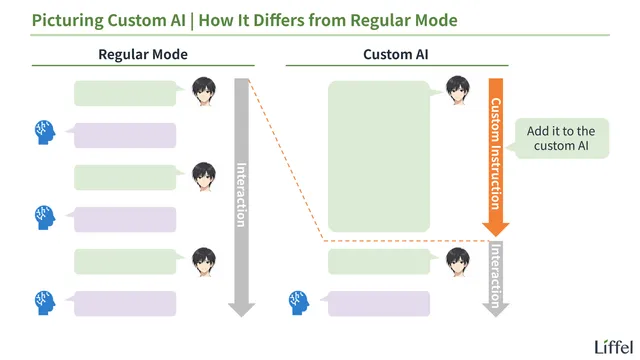
From around here, I recommend using features that control how AI behaves, such as custom AI and skills. The reason is that you will want to give the AI premises and processes, such as style rules for writing or templates for slides. Writing them into the chat every time is not realistic.
I cover custom AI in the entry below. Since it also includes a prompt for creating a custom AI, try making one if you have never used custom AI.
Start with Proofreading and Style Checks
In this category, I recommend starting with proofreading and style checks. Simply put, there is no reason not to. Have AI do a final check on every piece of writing you show to others.
I would also love for AI to check every email I write (a feature where, after you press “Send,” the AI checks the text before it actually goes out and sends it back only if there is a problem). Although this is not yet a standard feature of email apps, I expect it to become one before long (around 2028?).
What AI Can Do #5: Having It Do Work
Next is having AI do work. Examples include:
- Understanding things for you
- Analyzing
- Finding and organizing
- Writing code
- Repeating tasks
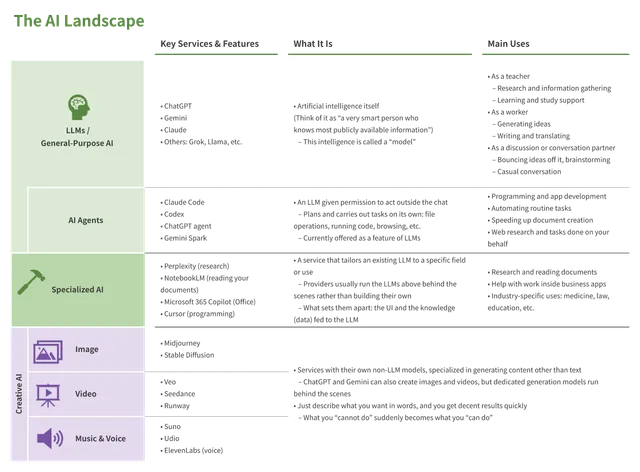
This is the area known as AI agents. For a detailed explanation of AI agents, see the entry below.
You Should Try AI Coding
At present, the most promising use in this category (= the one likely to have the biggest impact) is AI coding (= having AI write code).
As you will see if you try it, in AI coding the AI runs its own verification cycle (“That did not work. Let me try again.”) and completes the code. You only give instructions in natural language (ordinary words); no programming knowledge is required.
Of course, although checking whether the code is written correctly requires programming knowledge, in most cases that check is unnecessary. What we expect from a tool or system is that it produces the results we want, not that it is written in correct code. All we need to do is use the tool or system the AI built and check whether it produces the results we want. If it does, great. If it does not, tell the AI “this part does not work as expected,” and the AI will find and fix the cause itself.
That said, without programming knowledge, it is hard to see which parts of your work AI coding could make more efficient. Even so, all you need to do is ask the AI in ordinary chat: “Here is what I do. Is there anything I could automate or streamline?”
To sum up, it is already possible to build your own tools and systems to automate and streamline your work, with no programming knowledge.
I predict that over the next three to five years, this kind of efficiency gain through small tools and systems built with AI coding will spread to every industry and line of work. Since it is better to get ahead than to fall behind, I recommend building something, anything. You have nothing to lose even if it does not work out.
Tasks That Are Risky to Hand Over Completely
It is also useful to look at this from the opposite direction. For now, you should not put too much faith in handing tasks other than coding to AI. Since AI cannot verify its own work, either a human ends up having to check it, or the work moves forward unchecked.
The riskiest are probably “understanding things for you” and “analyzing.” When you hand these tasks to AI, you lose sight of what happens along the way.
For example, consider having AI summarize a document. AI can certainly summarize it in an instant, but you cannot tell what was left out of the summary. Even if something important was written there, you have no way of noticing it.
Seen this way, having AI summarize a document is fine for documents you are unsure whether to read at all, but risky for documents you absolutely must read and understand yourself. In this way, before handing something to AI, think about what risk you are taking on by doing so.
What AI Can Do #6: Generating Non-Text Media
Finally, there is generating non-text media. Typical examples include:
- Images
- Video
- Music
- 3D models
It is best to think of this as a separate track. When the media you generate differ, so do the AI models used to generate them and the best UI for the job. Since you will often use AI services other than the major LLMs, it is clearer to treat this area separately.
When to Take This Track
Note that “separate track” does not mean “you do not need to touch it.” In particular, it seems worth taking this track in the following two cases:
- You already outsource the creation of non-text media
- Producing it in-house with AI cuts costs by itself
- You are looking for clearer, more moving ways to communicate
- In general, adding non-text media makes communication clearer and more moving than text alone
- Example: turning something you wrote as text into a comic
Non-text media have the strength of being easier to grasp intuitively than text, and better at carrying emotion. When you want to rely on those strengths, it may be worth making them yourself.
Images (Illustrations) May Stop Being a Separate Track
In that sense, images (especially illustrations) may soon become something you are expected to include, even in formal contexts.
Now that illustrations are this easy to make, documents and presentations made entirely of text are not only harder to understand but also risk suggesting that the author is not doing their best to communicate clearly.
Fortunately, ChatGPT and Gemini both have image generation features. To make sure you do not miss chances to use them, I recommend trying them at least once.
Since the audience cannot easily tell whether a realistic, photo-like image is a real photo (showing reality) or AI-generated, however, you should not generate such images as casually as illustrations. Stick to images that are clearly drawings (clearly made up).
That covers what AI can and cannot do. Next, let us learn about custom AI, which I mentioned above.
All AI-related entries are collected below.